Category: Servers

  • Build a Netatalk Time Capsule for OSX Lion 10.7 using Debian 6.0 Squeeze

    Time Capsule
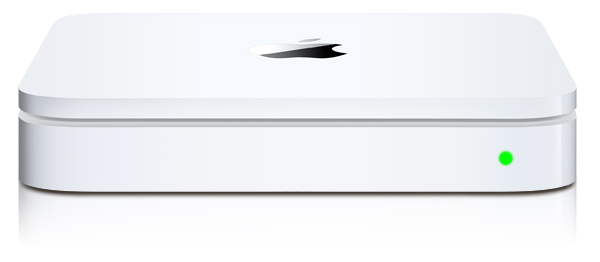
    After going to the Apple Store with a friend and seeing the $300+ Apple Time Capsule I decided to see if I could do the same thing with Netatalk. Turns out I could but if you’re using Debian stable like me you need to get at netatalk 2.2.x before it’ll work with OSX Lion 10.7.x. After seeing a variety of other examples out there on the net and getting a little confused as to why they were doing certain things I decided to just post how I did it. Also, rather than install things from source I like to use debian packages to keep servers clean. But there was a small problem due to a netatalk make bug that debian’s package didn’t account for. So I will post those packages I backported to stable for this.

    Packages


    Debian 6.0 (Squeeze) AMD64

    Debian 6.0 (Squeeze) i386

    Netatalk Time Capsule Server Setup


    After you’ve installed the packages create a service group by creating /etc/avahi/services/afpd.service and adding the contents below: (this might not be necessary with netatalk 2.2)

    <?xml version="1.0" standalone='no'?><!--*-nxml-*-->
    <!DOCTYPE service-group SYSTEM "avahi-service.dtd">
    <service-group>
      <name replace-wildcards="yes">%h</name>
      <service>
        <type>_afpovertcp._tcp</type>
        <port>548</port>
      </service>
      <service>
        <type>_device-info._tcp</type>
        <port>0</port>
        <txt-record>model=Xserve</txt-record>
      </service>
    </service-group>
    

    Make a directory to store your time machine data:

    mkdir /var/timemachine

    Now mark the volume saying it is a supported time machine share:

    touch /var/timemachine/.com.apple.timemachine.supported

    Define a volume in /etc/netatalk/AppleVolumes.default with the allowed user, usedots to support hidden files, uprivs for afp3 privileges that osx lion needs, and tm to enable time machine support. (highlighted below)

    # By default all users have access to their home directories.
    ~/                      "Home Directory"
    /var/timemachine         TimeMachine allow:joe cnidscheme:dbd options:usedots,upriv,tm
    

    Now that things are configured we need to restart avahi.

    /etc/init.d/avahi-daemon restart

    And restart netatalk

    /etc/init.d/netatalk restart

    Apple OSX 10.7.x Lion Setup


    Now set your OSX installation so it sees unsigned time machine volumes.

    defaults write com.apple.systempreferences TMShowUnsupportedNetworkVolumes 1

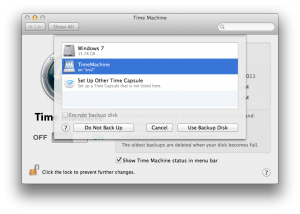
    You should now see your volume in Time Machine Preferences under “Select Disk…”.
  • Debian/Ubuntu Nmap 5.51 packages

    nmap
    So as many people know, Debian and Ubuntu’s often lag behind the stable releases of nmap due to the nature of releases. But sometimes you want to stay volatile on a few things to keep up with joneses at insecure.org and get at some of those cool new NSE scripts or features. Easy enough but I prefer packages for a multitude of reasons, mainly my own sanity maintaining any given system over time. So when there are no 5.51 packages around yet it might mean you have to take matters into your own hands. Hopefully my/our impatience, desires, results, (whatever you call it) at Orvant end up being useful to other people as well.

    Orvant Packages

    Debian 6.0 (Squeeze) AMD64

    Debian 6.0 (Squeeze) i386

    Ubuntu 10.10 (Maverick) AMD64

    Ubuntu 10.10 (Maverick) i386

    Source Package

  • Debian/Ubuntu wmi-client package with OpenVAS libwmiclient1 patches

    The other day I wanted to build some updated OpenVAS packages and realized I now needed libwmiclient1 for local Windows checks which wasn’t readily available anywhere. The old wmi-client package that used to be in debian was pulled due to the forked/branched nature of the source code as well as the idea that something better could be implemented with the upcoming Samba4 release. That didn’t seem to pan out in the end but OpenVAS still needs to use aspects of it to build libwmiclient1 for WMI support. I suppose monitoring applications like Nagios, Cacti, Zabbix, etc are all likely feeling the loss of wmic as well so I figure why not try to fill both gaps? Anyways, here are the packages we created for Orvant, OpenVAS or anybody else who wants or needs it.

    Orvant Packages

    Debian 6.0 (Squeeze) AMD64

    Debian 6.0 (Squeeze) i386

    Ubuntu 10.10 (Maverick) AMD64

    Ubuntu 10.10 (Maverick) i386

    Source Package

    Using the WMI client package (libwmiclient1 is only useful for OpenVAS):

    wmic -U <user>%<pass> //10.1.1.100 "select CommandLine,Handle,Name,ProcessId from Win32_Process"
    
    CLASS: Win32_Process
    CommandLine|Handle|Name|ProcessId
    “C:\Windows\system32\cmd.exe” |3512|cmd.exe|3512
    C:\Windows\Explorer.EXE|2740|explorer.exe|2740
    C:\Windows\system32\lsass.exe|436|lsass.exe|436