Build a Netatalk Time Capsule for OSX Lion 10.7 using Debian 6.0 Squeeze

Written by

in

, , ,

Time Capsule
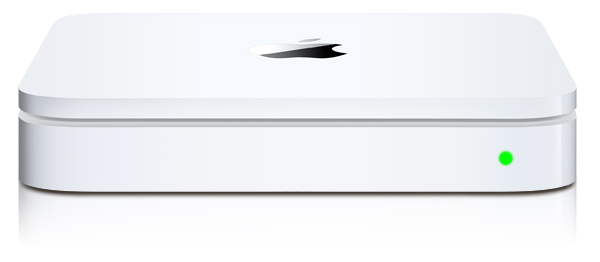
After going to the Apple Store with a friend and seeing the $300+ Apple Time Capsule I decided to see if I could do the same thing with Netatalk. Turns out I could but if you’re using Debian stable like me you need to get at netatalk 2.2.x before it’ll work with OSX Lion 10.7.x. After seeing a variety of other examples out there on the net and getting a little confused as to why they were doing certain things I decided to just post how I did it. Also, rather than install things from source I like to use debian packages to keep servers clean. But there was a small problem due to a netatalk make bug that debian’s package didn’t account for. So I will post those packages I backported to stable for this.

Packages


Debian 6.0 (Squeeze) AMD64

Debian 6.0 (Squeeze) i386

Netatalk Time Capsule Server Setup


After you’ve installed the packages create a service group by creating /etc/avahi/services/afpd.service and adding the contents below: (this might not be necessary with netatalk 2.2)

<?xml version="1.0" standalone='no'?><!--*-nxml-*-->
<!DOCTYPE service-group SYSTEM "avahi-service.dtd">
<service-group>
  <name replace-wildcards="yes">%h</name>
  <service>
    <type>_afpovertcp._tcp</type>
    <port>548</port>
  </service>
  <service>
    <type>_device-info._tcp</type>
    <port>0</port>
    <txt-record>model=Xserve</txt-record>
  </service>
</service-group>

Make a directory to store your time machine data:

mkdir /var/timemachine

Now mark the volume saying it is a supported time machine share:

touch /var/timemachine/.com.apple.timemachine.supported

Define a volume in /etc/netatalk/AppleVolumes.default with the allowed user, usedots to support hidden files, uprivs for afp3 privileges that osx lion needs, and tm to enable time machine support. (highlighted below)

# By default all users have access to their home directories.
~/                      "Home Directory"
/var/timemachine         TimeMachine allow:joe cnidscheme:dbd options:usedots,upriv,tm

Now that things are configured we need to restart avahi.

/etc/init.d/avahi-daemon restart

And restart netatalk

/etc/init.d/netatalk restart

Apple OSX 10.7.x Lion Setup


Now set your OSX installation so it sees unsigned time machine volumes.

defaults write com.apple.systempreferences TMShowUnsupportedNetworkVolumes 1

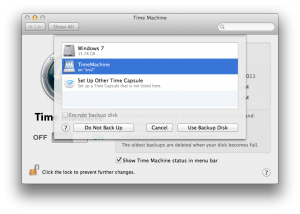
You should now see your volume in Time Machine Preferences under “Select Disk…”.
Comments

37 responses to “Build a Netatalk Time Capsule for OSX Lion 10.7 using Debian 6.0 Squeeze”

  1. Fred Avatar
    Fred

    Hi,

    I’d be interested in what you had to do to make the Netatalk package.

  2. Will Avatar

    I love the article, please check out `kremalicious`’s article from ’08. You two had very similar ideas!.

    http://www.kremalicious.com/2008/06/ubuntu-as-mac-file-server-and-time-machine-volume/

  3. mike Avatar
    mike

    Its the normal upstream package sources from debian but they need to have libacl1-dev added to build-depends otherwise you won’t get ACL support. So if you want to make your own you could rebuild theirs with that installed and you’d end up with the same thing I posted here.

  4. Chris Avatar
    Chris

    A gui interface on each computer would make this awesome.

  5. Jon Avatar
    Jon

    What did you use for hardware? Existing server or did you get a small atom based machine?

  6. mike Avatar
    mike

    I had an existing debian server that I used.

  7. Roman Shtylman Avatar
    Roman Shtylman

    It is important that the user you want to backup as has read and write permissions on the server folder (/var/timemachine in the example). Otherwise you will see a message along the lines of “User does not have read/write permissions. Contact system administrator” in OSx when you try to configure time machine.

  8. […] stumbled across a tutorial by Mike Palmer that walks you through the steps of creating your own Time Capsule: After going to the Apple Store with a friend and seeing the $300+ Apple Time Capsule I decided to […]

  9. […] I stumbled opposite a educational by Mike Palmer that walks we by a stairs of formulating your possess Time Capsule: […]

  10. […] I stumbled opposite a educational by Mike Palmer that walks we by a stairs of formulating your possess Time Capsule: […]

  11. Niels Zomer Avatar
    Niels Zomer

    Can you also build a cheap pc to do this? would like to try this out.

  12. […] stumbled across a tutorial by Mike Palmer that walks you through the steps of creating your own Time Capsule: After going to the Apple Store with a friend and seeing the $300+ Apple Time Capsule I decided to […]

  13. mike Avatar
    mike

    Sure, mine is running on an old Pentium D.

  14. Mike Palmer Avatar

    Sure, mine is running on an old Pentium D.

  15. Thomas Woinke Avatar
    Thomas Woinke

    Hi,
    I’m trying to build debian/ubuntu packages from netatalk sources myself. But I run into issues with an include being in libc-dev as well. Is that the make bug you are writing about? Or what did you do to build your packages?

  16. Mike Palmer Avatar

    No, mine are unaltered sources from debian:

    http://packages.debian.org/source/sid/netatalk

    What I posted were binaries built against squeeze with one exception. Make sure you have libacl1-dev installed since that package isn’t listed in build-depends.

  17. Ellis Johns Avatar
    Ellis Johns

    Great instructions. I ended following your instructions almost exactly, and it was one of the most painless installs/configs I’ve done. Thanks for the help. Only change was a missing library (libcrack2) that was easily installed with aptitude.
    E

  18. Mike Palmer Avatar

    You’re right, I forgot to say anything about installing those package dependencies. Usually I dpkg -i a package like this then immediately apt-get -f upgrade whatever dependencies it squawks about. (same thing aptitude, synaptic, etc all do) I do that because I like to avoid marking packages as manually installed in case I remove netatalk down the road and want to apt-get autoremove the remaining cruft.

    A full list of the the netatalk dependencies are here if interested:
    http://packages.debian.org/sid/netatalk

  19. Michał Kowalski Avatar
    Michał Kowalski

    Any way to limit size of created Time Machine disk?

  20. […] followed this guide for how to reconfigure my Debian Squeeze server to talk to Lion, but instead of downloading the […]

  21. Tony Scicchitano Avatar

    Any reason why you’d have to do that last step:

    joe@osx:$ defaults write com.apple.systempreferences TMShowUnsupportedNetworkVolumes 1

    I was running FreeNAS 8.0.4 (a FreeBSD based NAS server) and the TIme Machine share shows up in the Time Machine Preferences under “Select Disk…”?

  22. Tony Scicchitano Avatar

    Something like:

    hdiutil resize -size 500g MyFile.sparsebundle

    Here’s a good tutorial for making a secure backup with a size limit:

    http://michaelnozbe.com/mac-osx-lion-secure-backup-to-time-capsule-wi

  23. Florian Harr Avatar

    Are you using a sparsebundle or native ext3/4?

  24. Boddin Grégory Avatar
    Boddin Grégory

    Thanks, just used your tutorial on Debian kfreebsd and it worked flawless.

    Nice summary !

    http://www.siwhine.net/46,backup-osx-lion-10-7-on-debian-wheezy-kfreebsd-amd64.html

  25. Jocke Gustin Avatar
    Jocke Gustin

    Thanks for a great guide, seems to be working well. Excerpt for me, I get this error every time I try to install your package:

    sudo dpkg -i netatalk_2.2.1-1_i386.deb
    Selecting previously deselected package netatalk.
    (Reading database … 32698 files and directories currently installed.)
    Unpacking netatalk (from netatalk_2.2.1-1_i386.deb) …
    Setting up netatalk (2.2.1-1) …
    Starting Netatalk services (this will take a while): cnid_metad/usr/sbin/cnid_metad: 1: Syntax error: “)” unexpected
    invoke-rc.d: initscript netatalk, action “start” failed.
    dpkg: error processing netatalk (–install):
    subprocess installed post-installation script returned error exit status 2
    Processing triggers for man-db …
    Errors were encountered while processing:
    netatalk

    I have googled around the entire world and cant seem to get any of the guides working, du you know what might be the problem?

  26. andygale Avatar
    andygale

    Thanks for your efforts here! I’ve used it to setup my home server for Time Machine backups to avoid paying for a Time Machine much like you! My stuff is all managed with Chef these days. Here’s the cookbook I wrote to handle the things you describe in your post.

    http://github.com/salgo/netatalk-timemachine

  27. Magnus Brange Avatar

    When Im trying to connect to my AFP service I get a message which says that the serverversion is unsupported. This happens both when I browse the share in Finder and when I’m trying to connect via CMD+K.

    Someone know whats wrong?

  28. […] that’s it! There are plenty of other sites out there on how to configure netatalk for TimeMachine, so I’ll leave that as an exercise for the reader. Share this:TwitterFacebookLike this:LikeBe […]

  29. Patrick Bregman Avatar

    I know this is a rather old post, but for OS X 10.8.1 you can stop after restarting netatalk. From there on everything works. You don’t need to make Time Machine support unsigned volumes. Just tried this on a machine running Debian GNU/kFreeBSD Wheezy as a server and OS X 10.8.1 as a client 🙂

    Thanks for the great guide though, I had everything working in ~5 minutes o/

  30. Juan Avatar

    As of OSX 10.8 and Ubuntu 12.04 You don’t need to create the file “.com.apple.timemachine.supported”.

  31. meadlai Avatar
    meadlai

    great, but where to get the hardware which is portable and as beautiful looking as time capsule?

  32. Joseph P Campisi III Avatar

    Hey thanks for posting this howto. I built a dedicated Debian VM and attempted to pull in the right packages from testing. When I tried to connect from my mac book I got an error about being unable to connect to the time capsule disk.

    I was seeing the following errors in /var/log/syslog —

    Nov 18 21:06:43 timecapsule afpd[11819]: PAM DHX2: libgcrypt versions mismatch. Need: 1.5.0
    Nov 18 21:06:43 timecapsule afpd[11819]: DHX2: Couldn’t generate p and g
    Nov 18 21:06:43 timecapsule afpd[11819]: uam_load(uams_dhx2.so): uam_setup failed
    Nov 18 21:06:43 timecapsule afpd[11819]: uam: uams_dhx2.so load failure
    Nov 18 21:06:43 timecapsule afpd[11819]: volume “TimeMachine” does not support Extended Attributes, using ea:ad instead

    So it turns out I had some packaging problems. Rather then fight through it I just upgraded the VM to Debian testing (wheezy), rebooted and everything worked as expected.

    Thanks for the article I feel like you saved me $300 bucks! 🙂

  33. Mike Palmer Avatar

    No problem, glad it is still working out for people. I’ve been running mine since I did this little howto and haven’t had a problem so far.

  34. Whatsisname Avatar
    Whatsisname

    I’m getting the same error is Jocke Gustin with the i386 package. It appears to install, but when the service is started by the postinstall script it fails due to a syntax error.

Leave a Reply

Your email address will not be published. Required fields are marked *

This site uses Akismet to reduce spam. Learn how your comment data is processed.